SevenGrid
A calm habit tracker Your whole week, on one screen.
Mark what you did and move on. No streaks to break. No guilt.




On iPhone? SevenGrid arrives October 27. Drop me a line and you'll hear from me the day it ships.
Out now on Google Play No account Privacy first Free, no subscription
5.0 stars from 83 reviewsGo ahead, tap a cell. That's the whole interaction. Week and Today are both real.
Twenty themes. Pick one and the whole page follows, the phone above included.
Your week, quietly.
The day, up close
One screen for the day.
For everyone who has installed a habit tracker, then deleted it a week later.
No tabs, no dashboards, no daily summaries. Glance at the week Monday morning, then get on with your day.
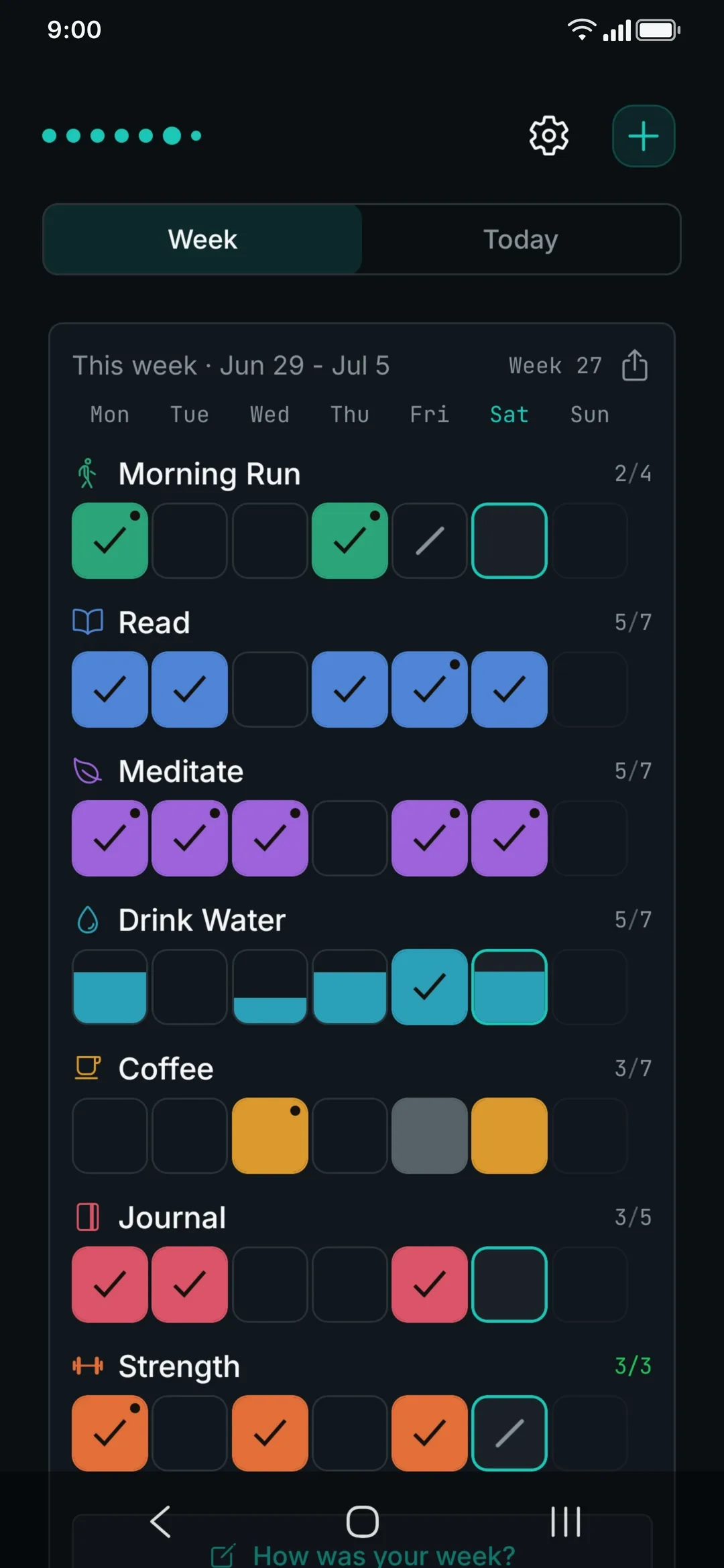
One screen, two views. The week grid, or a Today list with just what is still open. Done habits tuck themselves away. The app remembers which one you pick. Try the Today list in the phone above.
Pick a color for a habit. It stays that color in every theme.
Once a day Tap and the cell fills. Miss one and the cell simply stays empty.
A daily target Three glasses a day: each tap fills the cell a step further. A good day can run past the target if you let it: a quiet 4, never a demand.
At most Cutting back is a goal too: at most one a day. Days inside the limit fill; one day over turns a soft grey.
The three sample weeks are live, tap a day or two.
How it works
Add a few habits.
Name and color are enough. Goals, amounts and reminders come when you need them.
Tap the days you did them.
A tap a day is the whole job. Missed yesterday? Fill it in over coffee, the week stays open to edits.
See the whole week at a glance.
One row per habit, seven columns. One look and you know where the week stands; the app leaves the rest of your day alone.
No streaks, no guilt
A missed day is just a gap. Not a reset.
Streaks turn habit tracking into a game you can lose. A perfect run, until one day gets in the way, and suddenly stopping feels smarter than carrying on.
With a streak counter
Streak 4 · 2 days lost
- A chain you can break
- Miss one day, back to zero
- Skip today, start fresh tomorrow
- Pressure dressed up as progress
With SevenGrid
This week 6/7 · nothing lost
- Your whole week on one screen
- A missed day stays a calm gap
- Pick up wherever you left off
- Steady progress that actually stays
Try it: tap a day and see what each side makes of the gap.
- Empty: missed
- Stroke: deliberately skipped
Wednesday just stays empty. No reset, no red, no counter falling to zero. Habits form over weeks, not in a perfect chain, and one day does not erase the ones behind it.
Sick, traveling, just resting? Mark the day as skipped: a quiet stroke shows it was a rest day, not a missed one, and the reminder pauses. A standing rest day works too: no gym on Fridays, set it once, and every Friday rests on its own.
The other direction
Some habits are about less, not more.
Flip the goal direction to At most: 1 coffee a day, takeout on 2 days a week at most. At or under the limit counts as a win. A day over just dims a little, never red, never a punishment.
The problem is the mechanic, never you.
Weekly reflection
Tracking is easy. Reflection is the hard part.
Habit trackers count what you did. SevenGrid asks what it meant.
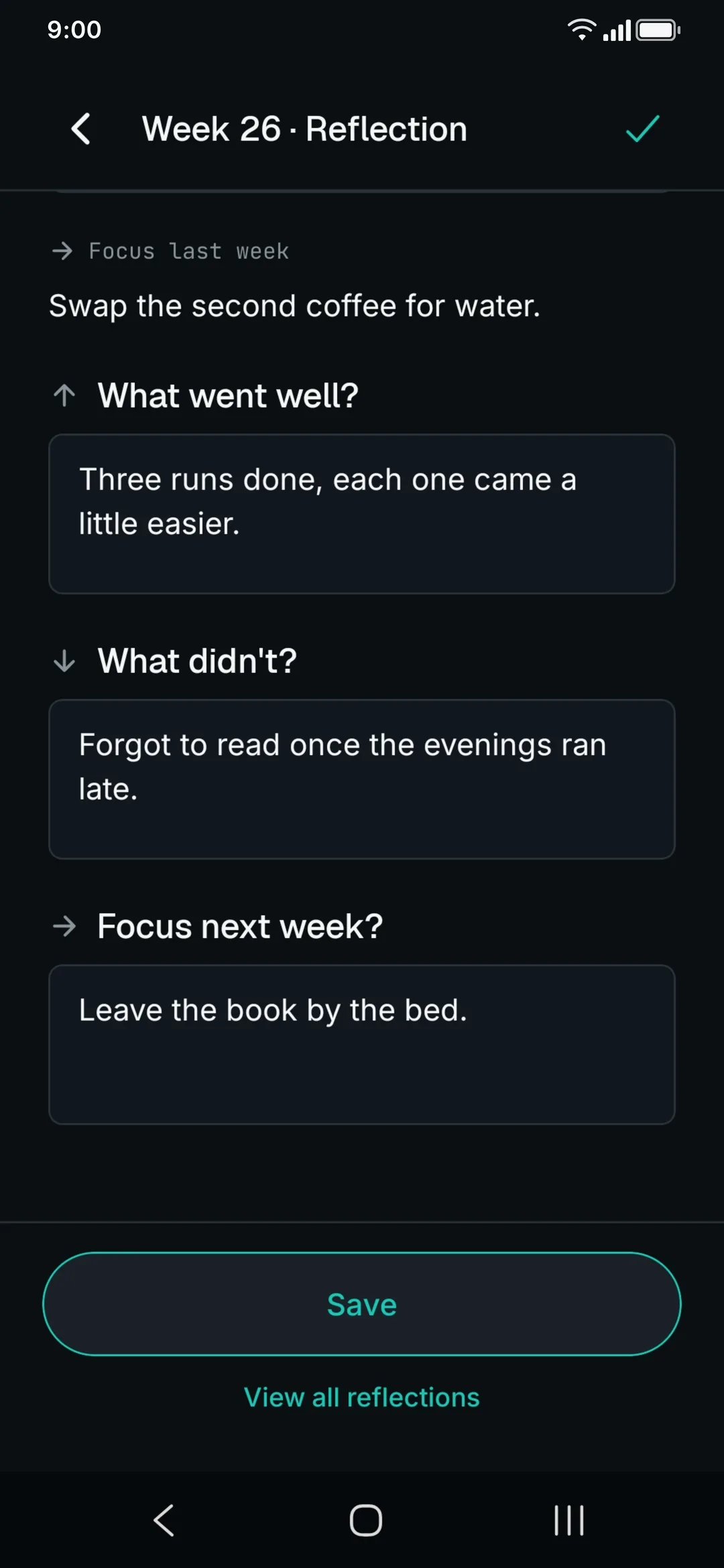
When the week ends, one unhurried screen waits before the next one starts. The questions never change.
Less “I tracked my habits,” more “here's what my week was actually like.”
A weekly ritual, written by you, for you. No grade at the end, just an honest look back, nothing to catch up on, and never a blank page.
- Mood
- What went well?
- Four runs and a clear head, a good week.
- What didn't?
- Forgot the journal on Sunday.
- Focus next week?
- Take Sunday evening for writing again.

See it in action
A look inside.
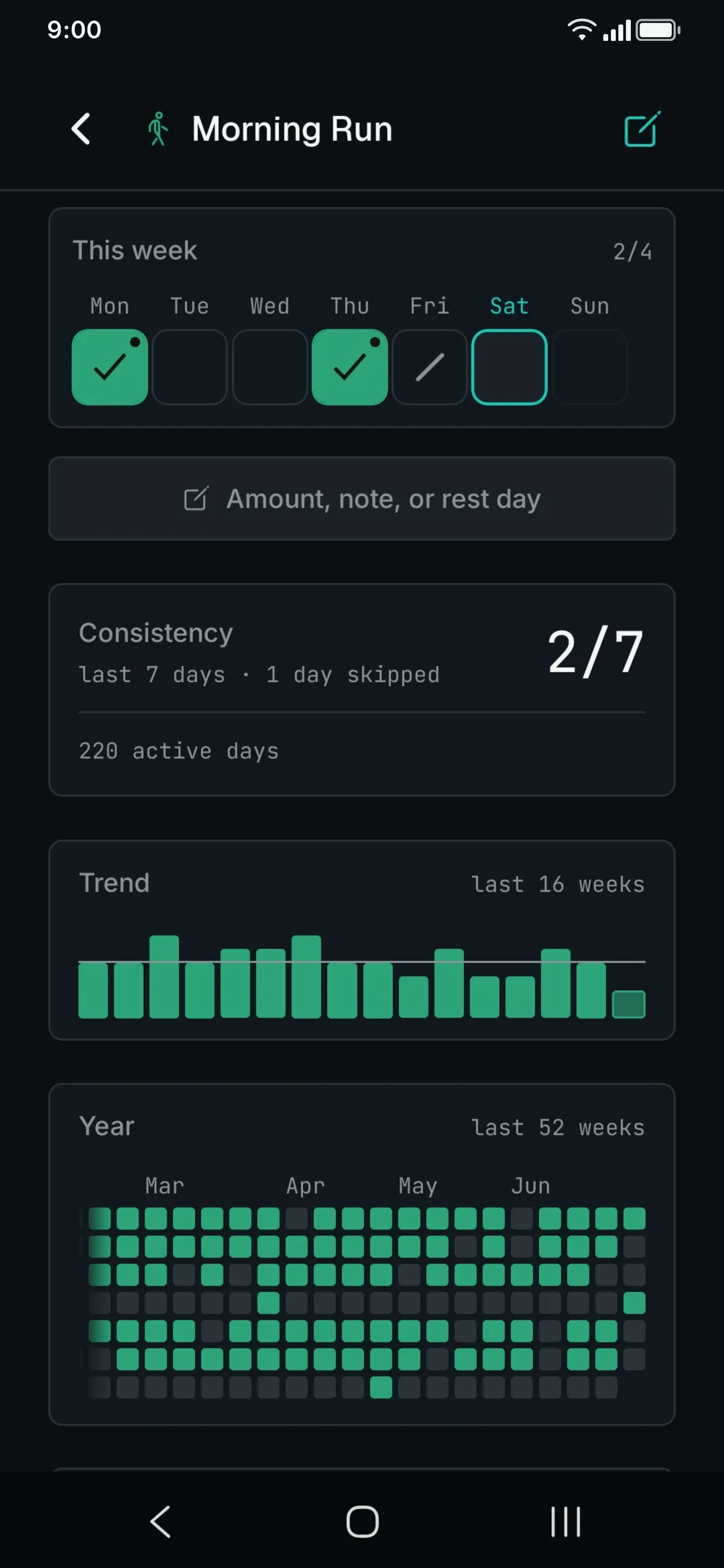
Real screens, not renderings. Any of them opens full size. The reflection screen itself is up top.





On your home screen
Check off without opening the app.
Privacy by design
Your week is yours, and it stays yours.
Open it and it runs, instantly and offline.
No account. No server. No sync.
There is simply nothing to sync, nowhere for it to go.
Stays with you
- Your habits
- Notes & reflections
- Your whole history
Leaves it · anonymous
- Crash reports SentryEU servers, can be turned off
- Buying Pro RevenueCatpurchase validation
- Offline
- Turn on airplane mode and the app works exactly the same, nothing missing.
- App lock
- Optionally lock the app with your fingerprint, Face ID or device code, with screenshot protection. Every part of it runs on the phone itself, and the lock arrives switched off.
- Backup
- Turn on the automatic backup (Android): once a day, CSV files into a folder you choose, on your device. Survives reinstalling. On iPhone there is no automatic backup; export through the share sheet whenever you like.
- On a new phone
- Android's own Google backup deliberately leaves the habit database out, so it stays where you typed it. A new phone picks it up straight from those CSV files. On an iPhone, the database can be part of your iCloud device backup while that is switched on.
Like the sound of this? Get it on Google Play
Pricing
Pay once.
It's yours.
No subscription. No ads. No profiling.
Forever.
No account, no signup, and no trial period that runs out. Enough to build the habit.
Unlock Pro inside the app.
One payment. After that no account, no expiry and nobody who locks you out. Pro is not going anywhere: upgrade once you know the app stays with you.
Updates guaranteed for at least 24 months from purchase, planned for considerably longer.
| Feature | Free | Pro |
|---|---|---|
| HabitsHow many you track at the same time | 3 | unlimited |
| Week historyHow far back you can page | 4 weeks | all of it |
| ThemesA palette for the whole app, not just a dark mode | 2 | all 20 |
| The full week gridSeven days side by side, not just today | included | included |
| Full CSV exportYour data as a file, any time and complete | included | included |
| Home-screen widgetsGrid, habit row, Today, clock and heatmap. Android only | all five | all five |
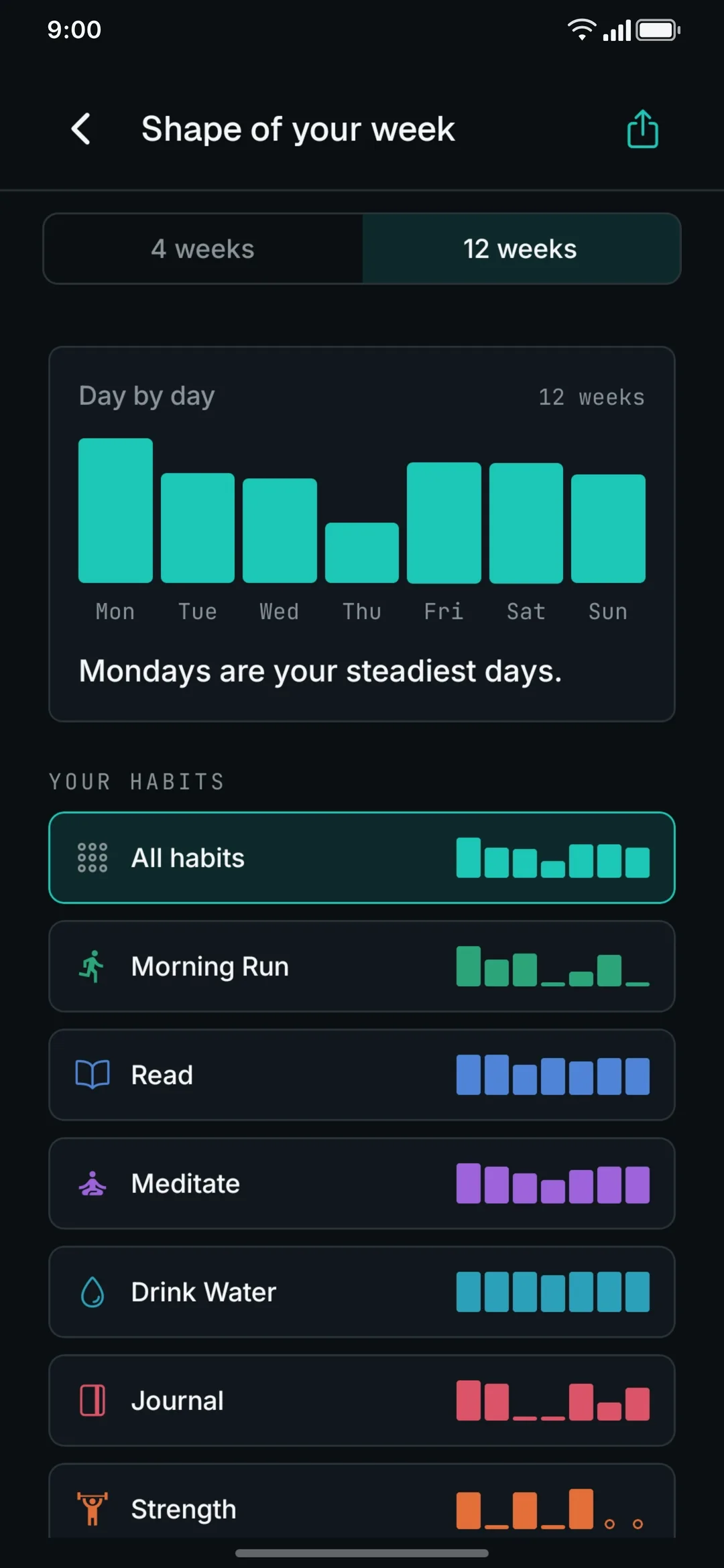
| The shape of your weekThe pattern of your seven days | a peek | in color |
| Your weekly statsThe strength, rhythm and rest of your weeks, without a verdict | not included | included |
| Per-habit remindersWeekday-specific times, check off right from the notification | not included | included |
Three rows are deliberately identical: the full week grid, the full CSV export and all five widgets belong to Free. Your data is not a Pro feature. And whatever joins Pro later, features as well as themes, is included with no repurchase.
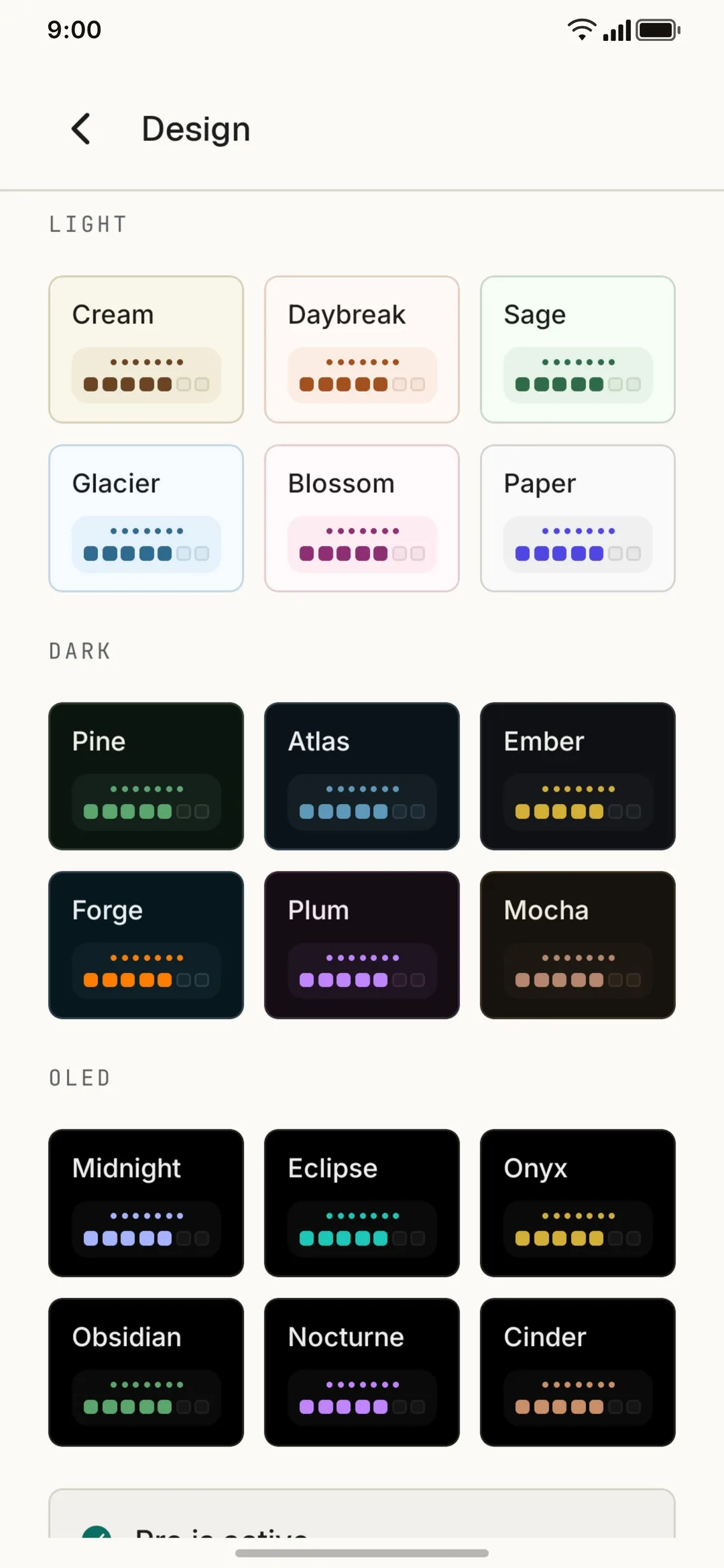
Twenty hand-tuned themes
Eighteen of them are what Pro unlocks, and you can try every one right here. Light, dark and true black for OLED, each palette layered in stepped surfaces instead of flat blocks.
Standard
Light
Dark
OLED
Subscriptions never stop. One payment does.
Maybe this is the one you don't delete.
On Android and iPhone
A calmer way to keep at it.
“I’ve tried a lot of habit trackers, but SevenGrid is the first one that actually feels calm instead of stressful.”
“This gives you a single clean and straight up view of your week. It is simple and to the point.”
“Simple UI, very well thought, and yet feature rich.”
On iPhone? SevenGrid arrives October 27. Drop me a line and you'll hear from me the day it ships.
 Scan with your phone
Glad you found your way down here.
SevenGrid is the work of one indie dev in southern Germany. It started with a simple annoyance: every habit tracker I tried added stress instead of taking any away.
My own habits live in SevenGrid, day after day, and the app is never finished. Everything new lands on r/SevenGrid first: release notes, the stories behind them, and whatever else is taking shape. Come say hi, and if you stick around, that makes my day.
- Stefan
Built in the open
New releases, the notes behind them and the roadmap questions all land on r/SevenGrid. Read along, or tell me what SevenGrid should learn next.
The quiet extras
Everything else, included.
Nothing here asks for attention: these are the small touches that wait until you reach for them. And every single one is free.
-
Five home-screen widgets
The week grid, a single-habit row, a Today checklist, a clock that carries the habits you pick and a history heatmap. On Android.
-
A year, at a glance
A whole year of consistency as a calm tile view, with no streak pressure.
-
Share a week
Turn a week into a quiet image and share it wherever you like.
-
A daily local backup
Pick a folder once; a CSV lands there every day. No cloud. On Android.
-
An icon and a color
Give each habit one of over 100 icons and one of 18 colors, easy to tell apart in the grid.
-
Goals your size
Once a day, three times, or 8 glasses of water. And if you like, a habit can count past its goal.
-
A standing rest day
Every Friday off? Set it once and that weekday rests on its own, week after week.
-
Identity and if-then
Anchor a habit to an identity or an if-then sentence. Both optional.
-
Notes, amounts and duration
Long-press a day: a short note, an amount or a duration, purely descriptive. Later the same press shows it all again, no editor.
-
Mood and active days
An observation, never a grade: one line about how your mood and your active days move together.
-
An archive, not a delete
Retired habits move to the archive. They stay readable there, history and all, and come back whenever you need them.
-
Monday, Sunday or Saturday
Your week starts where you expect it to. The grid, the stats and the widgets follow along.
-
Close at hand
A quick-settings tile (Android) opens the app from anywhere, and the app icon’s shortcut starts a new habit right away.
-
Quiet hours
Set a quiet window and no reminder makes a sound inside it. And once everything is done for the day, the daily reminder has nothing left to say.
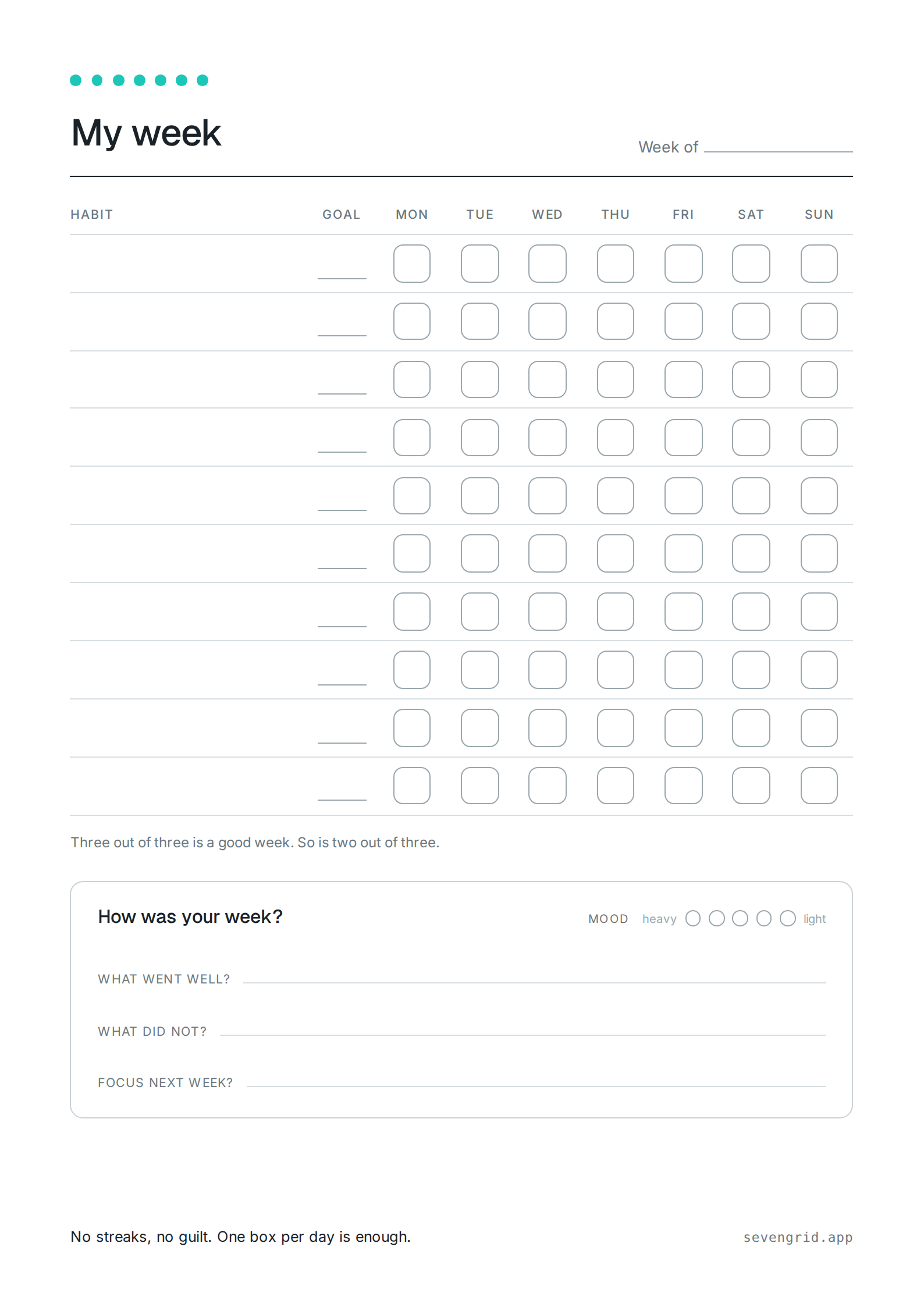
Rather do it on paper?
The weekly grid comes as a printable template too: one blank week on A4, US Letter, A5 or Half Letter, with seven columns and a row for every habit.
Choose where the week starts, how many rows you need and whether the weekly review comes along. Then print straight from the browser.
Set up the weekly grid Weekly grid as a PDF Weekly grid as a PNG
FAQ
Common questions.
Getting started
How do I get it?
SevenGrid is out now on Google Play, Android first. Free to start.
Get it on Google Play. The iPhone version follows on October 27.
How much does it cost?
SevenGrid is free to start: three habits, your last four weeks, and full CSV export.
Pro is a single one-time payment, no subscription, ever. One payment unlocks unlimited habits, your full history and every Pro theme. New Pro features and themes added later are included too, at no extra cost. Google Play shows the current price for your country.
Will there be an iOS version?
Yes, on October 27: Apple has approved the iPhone app, and its release is scheduled for that day. Android came first. The app is built in React Native, so both share the same calm core. The App Store button goes live when the listing opens. If you'd like a heads-up, send me a short note and you'll hear from me the day it ships.
What about web or desktop?
No. A habit tracker you check at your desk gets ignored. SevenGrid is mobile-first on purpose. It sits where your day already happens.
Is there a paper version?
Yes. The SevenGrid weekly grid comes as a printable sheet: an empty week on A4, US Letter, A5 or Half Letter, as many rows as you need, with or without the weekly review. You set it up in the browser and print straight away, no signup and nothing stored.
Paper has the same advantage as the phone: it is where you are. That holds even if you never install the app. To the printable weekly grid.
How it's meant
Why no streaks?
Because the streak is the part that makes people quit. The day it breaks, starting over next week feels more rational than continuing today.
SevenGrid drops the counter, so a missed day is just a gap, not a reset, and coming back is the easy choice.
What happens when I miss a day?
Nothing. In SevenGrid the day simply stays an empty cell, and every mark around it stays put. If you only forgot to log, tap the day after the fact.
And when the gap was deliberate, mark the day as skipped; the reminder pauses with it.
Will the app remind me?
Only if you want it to. SevenGrid sets reminders per habit, optionally with a different time on each weekday, and you tick them off straight from the notification without opening the app. Out of the box not a single one is set. Per-habit reminders are part of Pro.
The Sunday evening nudge for the weekly review is free. And if you leave it unopened for three weeks, the app switches it off by itself instead of knocking again.
Can it track bad habits too?
Yes. In SevenGrid you set a habit's goal direction to At most, and each tap logs one occurrence: at most 1 coffee a day, sweets on at most 3 days a week. Bigger limits work too, counted as a plain number in the cell. A day inside the limit simply fills its cell, the same mark as any met goal.
Going over is shown plainly, never in red. Shame does not change behavior.
What if once a day isn't enough?
Then set a daily target in SevenGrid: meditate three times, 8 glasses of water. Small targets fill the cell step by step; bigger ones count along as a plain number and flood with color when you arrive.
And if you like, let a habit count past its goal. The cell then simply shows the real count, a 4 over a goal of 3. Opt-in, per habit; the goal stays a floor, not a ceiling.
Does it work with TalkBack and VoiceOver?
Yes, both. In SevenGrid every cell names its habit, day and state, changes are announced, and at large font sizes the app breaks habit names across lines instead of clipping them. The Android widgets follow the same rule and drop a row before they cut text.
Accessibility is part of the test suite here, not an afterthought. If something still trips your screen reader, tell me and it gets fixed.
There is a whole page on this: which features I verified on a device, where the app stops short, and what I have never tried. Read the accessibility statement.
Data and trust
Do I need an account?
No. SevenGrid needs no account: everything lives on your device, with no sign-up, no email collection and no cloud sync.
The app makes just two kinds of network call: Pro purchase validation, and anonymous crash reports (you can turn those off in the app).
Can I export my data?
Yes. SevenGrid has full CSV export from day one, Free or Pro, plus a full export as a single JSON file. The schema stays open so any tool that reads CSV or JSON can open it.
Separately, the optional daily backup (Android) saves everything too. Your history stays yours.
Can I bring my old data along?
Yes. SevenGrid reads its own CSV and backup files back in, history, notes and reflections included. Switching phones is one folder and two minutes.
Data from another app can come along too, once you map its columns onto the open CSV schema. And if a file does not fit, the import tells you row by row what is wrong.
Who is behind SevenGrid?
One person. I'm Stefan, an indie dev from southern Germany, and I build and maintain SevenGrid on my own.
I use the app every day myself and keep building on it over the years, funded by a one-time purchase rather than ads or investors. That way it only answers to the people who use it. Every release is written up on r/SevenGrid, so you can see for yourself what has been happening.
Choosing an app
Which habit tracker works without streaks?
SevenGrid does, and not as a switch you turn off: a counter for consecutive days does not exist anywhere in the app. A habit is one row of seven boxes, one tap per day, and the week is the unit that counts.
That is the whole design decision. Hiding a streak counter still leaves the app caring about the number, while SevenGrid never has that number to begin with, so a gap costs you the day and nothing more.
Is there a habit tracker without a subscription?
SevenGrid is bought once. Three habits stay free for as long as you like, and a single payment lifts the limits for good, including whatever features and themes arrive later.
A habit is a decade-long project, and paying rent on one by the month never made sense to me. There is no monthly plan, no yearly plan and nothing to cancel.
Which habit tracker works offline and without an account?
SevenGrid works fully offline and asks for no account: no sign-up, no email address, no cloud sync. What you enter stays in the app's own storage on your phone, and flight mode changes nothing about it.
Two calls, and that is the whole list: checking a Pro purchase, and an optional crash report you can switch off. Nothing else leaves the phone, because there is nowhere of mine for it to go.
Is there a habit tracker with weekly goals instead of daily ones?
SevenGrid counts in weeks. A goal reads three times a week rather than every day, and the seven boxes show how the week is actually going instead of how long a chain has grown.
The week is the frame, and daily targets sit inside it rather than beside it: a habit can still ask for three taps a day, and one you want to cut back on takes the At most direction instead.
Do streaks actually help with habits?
While a streak is alive it does pull you along. The interesting part is what happens when it breaks: in a 2023 study in the Journal of Consumer Research, people who could see their broken streak engaged measurably less afterwards, and hardest hit were those who blamed themselves for the break.
So the same machinery that pushes you at the start drops you later on, which is why SevenGrid leaves the counter out. The long version, with the sources, is the essay Why no streaks.
Still wondering something? Email me.